
The first time I ran a Facebook ad, I felt like I understood what I was doing. I had a product, I had a budget, and I hit publish feeling confident. A few days later, I had spent thousands and made almost nothing back. No sales. Just a shrinking ad account balance and a growing sense that something fundamental was wrong, and it took me months of testing, failing, and adjusting to understand exactly why my Ad was not yielding any results.
If you are new to Facebook ads, this guide is not going to walk you through the basic button-clicking steps of setting up a campaign. You can find that anywhere. Instead, I want to walk you through the real mistakes I made, the ones I see other beginners make constantly, and exactly how to fix each one. This is everything I wish someone had told me before I burned through my first ad budgets.
Why Most Beginners Waste Money on Facebook Ads
Here is something nobody tells you clearly enough: Facebook ads do not fail because the platform does not work. They fail because of small, specific, fixable mistakes stacked on top of each other, such as a broken pixel, the wrong objective, unclear messaging, or an audience that was never going to buy in the first place.
I learned this the expensive way. Let me walk you through every mistake, one at a time.
Mistake 1: Your Facebook Pixel Is Not Set Up Properly (Or Not Tested)
This is the single most overlooked technical issue in beginner Facebook advertising, and it was one of my own biggest early failures. Your Facebook Pixel is the tracking code that tells Facebook what happens after someone clicks your ad. Did they view your page, add to cart, or complete a purchase?
If your pixel is not firing correctly, Facebook has no idea whether your ad is actually working. It cannot optimize toward buyers because it does not know who is buying. I discovered this myself when I noticed a tracking gap between my Selar confirmation page and my pixel data. People were genuinely purchasing, but Facebook was not seeing it, which meant the algorithm kept showing my ad to the wrong people instead of learning from real buyers.
How to set up your Facebook Pixel correctly: Go to Meta Events Manager, create your pixel, and install it on every page in your funnel, such as your landing page, your product page, and especially your confirmation or thank-you page. If you are selling through a platform like Selar or Gumroad, check whether the platform supports direct pixel integration, and confirm the tracking connects all the way through to the final purchase step, not just the initial page view.
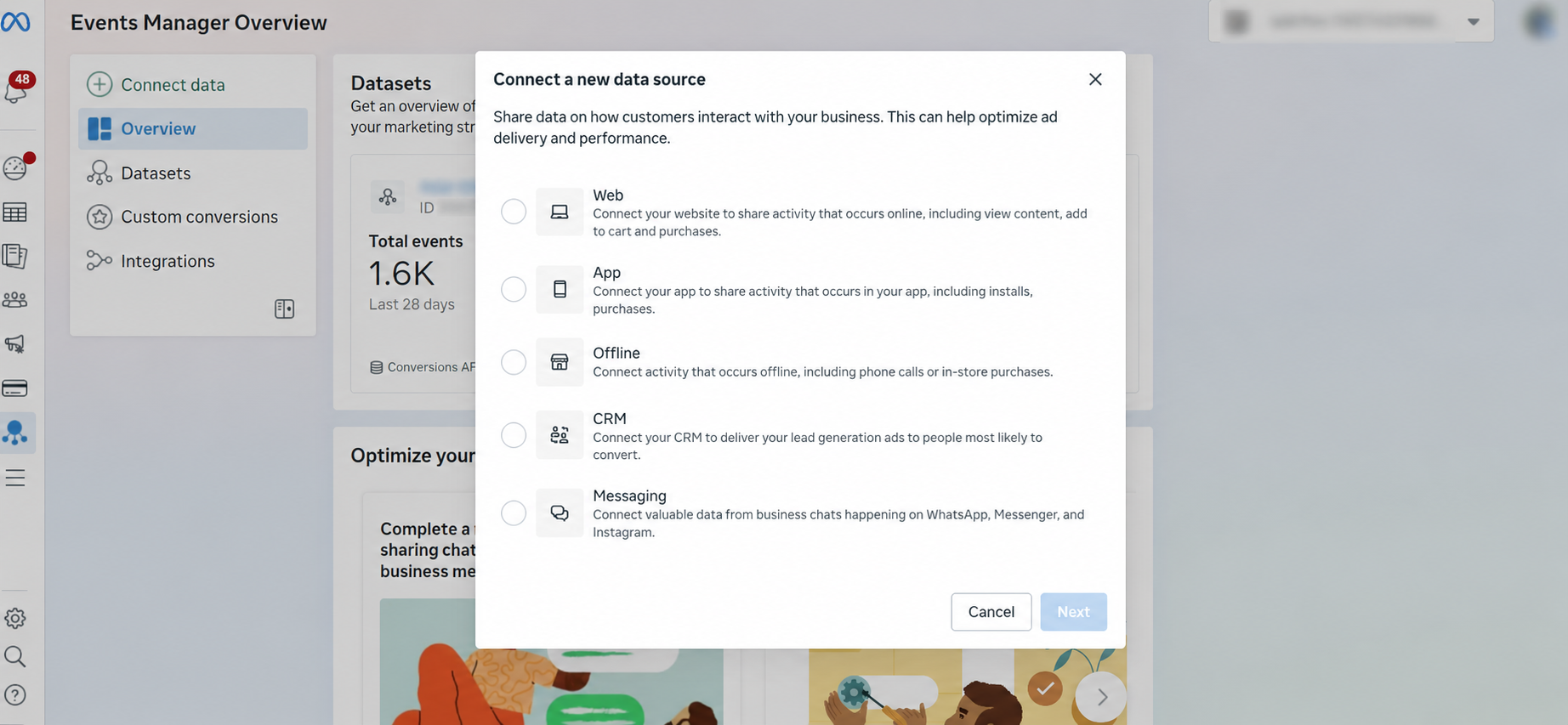
How to know if your pixel is working: Use Meta’s free “Pixel Helper” browser extension. Visit your own website with it active. It will show you in real time whether the pixel is firing and which events are being tracked. Also check Events Manager directly; if you see test events registering as you click through your own funnel, your pixel is working. If nothing shows up, something in your setup is broken and needs fixing before you spend another dollar on ads.
Mistake 2: Choosing the Wrong Campaign Objective
Facebook asks you to choose an objective before you even write your ad, and this single choice shapes everything about how your campaign performs. Choosing the wrong one is one of the most common and costly beginner mistakes.
The lead’s objective is designed to collect data such as names, emails, and phone numbers. Use this when you want to build a list or gather interested contacts before a sale, not when your goal is an immediate purchase.
Sales objective is built specifically for driving purchases and works best when you already have a clear product page and checkout process ready to convert.
Here is something I learned through real testing: if you are selling a digital product and you are not yet sure whether real interest exists, it is often smarter to test with a cold audience using a lower-commitment objective first, like traffic or engagement, before committing straight to a sales objective. This lets you validate genuine interest cheaply before spending a serious budget chasing conversions from an audience that has never heard of you.
Read, How to Write a Sales Page That Converts — Complete Guide With 8 Real Examples
Some products also require a warm audience rather than a cold one. If your offer needs explanation, trust-building, or nurturing before someone is ready to pay, like a higher-priced course, running straight to a sales objective on cold traffic often burns budget with little return. In these cases, running lead generation first, then nurturing that audience with content or email before presenting the sale, produces significantly better results than expecting a stranger to buy on the very first interaction.
Mistake 3: Your Landing Page or Sales Page Does Not Clearly Describe Your Product
If you are running an ecommerce ad, your ad’s job is only to get the click; your landing page or sales page has to do the actual convincing. I have watched perfectly good ads fail simply because the page they linked to left visitors confused about what exactly they were looking at.
Your landing page needs to answer, within seconds, what the product is, who it is for, what it costs, and why the visitor should trust you enough to buy. If any of those answers are missing or buried under too much text, visitors leave, and no amount of ad spend fixes a landing page problem.
How to apply this: Before running any ad, read your landing page as a complete stranger would. If you cannot immediately understand the offer, the price, and the value within the first few seconds, fix your page before you fix your ad.
Mistake 4: Targeting the Wrong Audience for Your Product
This mistake sounds obvious once you say it out loud, but it happens constantly. If you are selling watches and accidentally target an audience interested primarily in food and cooking content, you might get plenty of engagement, likes, comments, even clicks, but almost no sales, because engagement and buying intent are not the same thing.
Your Demographic targeting has to match the actual buyer of your specific product, not just anyone who might casually interact with your content. I learned this by testing broad, loosely defined interest categories early on, seeing encouraging engagement numbers, and then noticing zero corresponding sales. The audience was interested in scrolling, not in buying what I was selling.
How to apply this: Build your targeting around people who have demonstrated actual purchase behavior related to your product category, not just broad, adjacent interests that sound related but do not reflect real buying intent.
Mistake 5: Ignoring Age Range in Your Targeting
Age range is not a minor detail. It directly affects whether your product’s price point makes sense to the person seeing your ad. A premium watch positioned around career success and confidence will resonate very differently with a 22-year-old student than with a 35-year-old working professional with disposable income.
How to apply this: Match your age range targeting to your actual price point and positioning. If your product is genuinely a premium or higher-ticket item, narrowing your age range toward people more likely to have the income to purchase it will improve your conversion rate significantly compared to a broad, unfiltered age range.
Mistake 6: Weak Ad Creative That Does Not Catch Attention
Your ad creative, which is the image or video people see, has less than a second to stop someone from scrolling past. This is not an exaggeration; it is how quickly people move through their feed.
Here is something I learned through direct testing: some products perform better with a static image, and others perform significantly better with video. A wristwatch photographed cleanly with strong lighting can outperform a video for a simple, visually clear product. But a product that benefits from demonstration, like showing it in use, showing a transformation, showing a process, often performs far better as video, because it gives the viewer context a still image cannot.
How to apply this: Do not assume video is automatically better. Test both formats for your specific product and let the actual data, such as the click-through rate and conversion, tell you which format your audience responds to.
Mistake 7: Setting the Wrong Budget
Budget mistakes go in both directions. Too small a budget means Facebook’s algorithm never gets enough data to optimize properly. Too large a budget spent carelessly can burn through money before you learn anything useful.
One specific issue I encountered directly is this: Meta’s “Highest Volume” bid strategy can accelerate spend rapidly once it detects any signal, sometimes burning through budget far faster than expected without a corresponding increase in quality results. Switching to a Cost Per Result goal instead gave me significantly more control, letting the algorithm optimize toward a specific target cost rather than simply maximizing volume regardless of efficiency.
How to apply this: Start with a modest daily budget that allows a few days of real testing without risking your entire allocation on unproven creative and targeting. Once you identify a winning combination, scale gradually rather than jumping the budget dramatically overnight.
Mistake 8: Judging Results Too Quickly
This is a mistake nearly every beginner makes, myself included. Some ads take several days to start yielding real results as Facebook’s algorithm gathers data and optimizes delivery toward people more likely to convert. Judging a campaign as a failure after just a few hours or even one full day often means abandoning a campaign right before it would have started performing.
Read, Sales Copy Templates: How to Find and Replicate Winning Ad Copy in 2026 (With Examples)
How to apply this: Give a new ad campaign at minimum three to five days before making major judgments, unless your budget is being burned so fast that immediate intervention is necessary. Early data is noisy; patterns become clearer over a slightly longer window.
Mistake 9: Weak or Generic Ad Copy
Even with perfect targeting and a working pixel, weak ad copy, which is the actual written message in your ad, can quietly kill your results. Generic copy that could apply to any product in any niche fails to create the specific emotional pull that makes someone stop and pay attention.
From my own testing, ad copy that led with a specific, relatable pain point consistently outperformed copy that simply described product features. Speaking directly to a frustration or desire the viewer already feels does more persuasive work than any list of specifications ever will.
How to apply this: Open your ad copy with the problem your audience is already experiencing, not with a description of your product. Let the product enter the conversation as the solution, not the headline.
Understanding Facebook Advantage+ Campaigns
Advantage+ is Meta’s automated campaign system, designed to let the algorithm handle much of the targeting, placement, and creative optimization decisions that used to require manual setup. Instead of manually selecting narrow audience segments, Advantage+ tests broadly and lets Facebook’s machine learning identify who actually converts.
This can work exceptionally well once your pixel is properly set up and has enough historical conversion data to learn from. The algorithm genuinely gets smarter with more signal. However, if your pixel tracking is incomplete or you are a brand new advertiser with zero conversion history, Advantage+ can struggle to find the right audience efficiently, since it has nothing reliable to learn from yet.
How to know if Advantage+ is right for you: If you already have a properly functioning pixel with some purchase history, Advantage+ campaigns are worth testing alongside manual targeting to compare performance. But if you are brand new with no conversion data yet, starting with slightly more manual control while you build up pixel data often produces more predictable early results.
Understanding Ad Placement
Ad placement refers to where your ad actually appears, such as Facebook feed, Instagram feed, Instagram Stories, Reels, Messenger, and the Audience Network of partner apps and websites.
Some placements require a healthier budget to perform well simply because competition for that specific placement is higher. Instagram Stories and Reels, for example, often demand stronger, more native-feeling creative and can be less forgiving of a low budget compared to standard feed placements.
I found that certain placements consistently outperformed others for my specific product and audience, while some barely generated any meaningful engagement at all despite receiving budget. This is exactly why testing matters. Assuming all placements perform equally is a mistake that quietly wastes spend.
How to apply this: Start with automatic placements to gather initial data on where your specific ad performs best, then consider narrowing to your top-performing placements once you have enough data to make that decision with confidence, rather than guessing upfront.
Putting It All Together: What I Would Do Differently
If I were starting over with everything I know now, I would confirm my pixel is properly tracking every step of my funnel before spending a single dollar. I would choose my campaign objective based on genuine audience temperature — cold traffic for validation, warm nurtured traffic for higher-commitment sales. I would make sure my landing page could stand entirely on its own, clearly answering what, for whom, and why trust me. I would test both image and video creative rather than assuming one format automatically wins. And I would give every test enough time and enough, but not excessive, budget before drawing conclusions.
Read, How to Identify High-Quality Leads That Convert to Sales in 2026
None of these fixes are complicated individually. But stacked together, they are the difference between the campaign that made me thousands with zero returns, and the campaigns that eventually taught me how Facebook advertising actually works.
Frequently Asked Questions
How do I know if my Facebook Pixel is working correctly?
Use Meta’s Pixel Helper browser extension to check in real time whether your pixel is firing on each page, and verify in Events Manager that key events like page view, add to cart, and purchase are registering all the way correctly through your funnel, including your confirmation page.
Should I choose the Leads objective or the Sales objective for my ad?
Choose Leads when your goal is collecting contact information for later nurturing, particularly for higher-priced or higher-consideration offers. Choose Sales when you have a clear product page ready to convert immediately and want to drive direct purchases.
How much budget do I need to start testing Facebook ads?
There is no universal number, but starting with a modest daily budget that allows three to five days of consistent testing without exhausting your entire allocation gives the algorithm enough time and data to begin optimizing properly.
Is video or image better for Facebook ads?
It depends entirely on your specific product and audience. Test both formats directly rather than assuming either format is automatically superior, and let your actual click-through and conversion data guide your decision.
Want to learn the complete system for running profitable Facebook ads, selling digital products, and building income online using AI tools? Get my AI Hustle eBook on Selar or Gumroad.
Leave a Reply